
How to anonymize data before using ChatGPT (with a free local tool)

Every day, in thousands of companies, someone copies a client's email, a contract or a list of students and pastes it into ChatGPT to move faster. At that moment, personal data that was under your control moves to a server that is not yours, with no record anywhere. The fix is not banning AI: it is a 10-second habit almost nobody has, anonymizing before pasting. In this article I show you the manual method and give you, for free, the open source tool we use ourselves: it runs 100% locally and is tuned for Spanish data.
What really happens when you paste client data into ChatGPT?
The text travels to the provider's servers and is no longer under your control. In the free tiers of most assistants, your conversations may also be used to train future models unless you opt out. And even if you pay for a plan with better guarantees, the core issue stays the same: personal data about a client, a student or a candidate has left your company without that person knowing.
The striking part is who does it. It is not the intern: it is the manager pasting a contract to summarize it, the HR lead uploading forty CVs to filter them, the clerk asking for a complaint letter with the client's name, national ID and address inside. People doing their job well, with a huge oversight in the middle.
Is it legal to use ChatGPT with personal data? What matters about GDPR
Using AI is perfectly legal. What compromises you is feeding identifiable third-party data into an external tool without control: GDPR requires you to know who processes the data you hold, with what guarantees and for what purpose, and a general-purpose chat used from an employee's personal account answers for none of that. The good news: for the vast majority of uses, the AI does not need to know who the person is. If the text is anonymized, you are no longer sharing personal data, and the problem disappears at the root. This is not legal advice; it is the simplest way to remove the problem: less data out, less risk in.
The manual method: anonymize in 10 seconds before pasting
You do not need to install anything to start today. Just a three-step habit:
- Before pasting a text into the AI, spot whatever identifies someone: names, national IDs, phone numbers, emails, addresses, bank accounts.
- Replace each item with a numbered label: [NAME_1], [PHONE_1], [EMAIL_1]. If the same person appears three times, all three get the same label.
- Paste the clean version, work with the AI and, when you copy the result back, restore the real data on your own machine.
The AI could not care less whether your client is called Laura or [NAME_1]: the summary, the email or the advice it returns is the same. You lose 10 seconds and the data never leaves your company.
The free tool: a local, open source anonymizer for Spanish
The manual method holds up until the text has thirty data points, or until the person applying it is in a hurry. It happened to us while preparing an AI training: we needed a whole team to anonymize without thinking about it, and what existed either only worked well in English or sent the text to yet another cloud, exactly what we wanted to avoid. So we built it ourselves, and now we are releasing it for free, open source: the Soul IA local anonymizer.
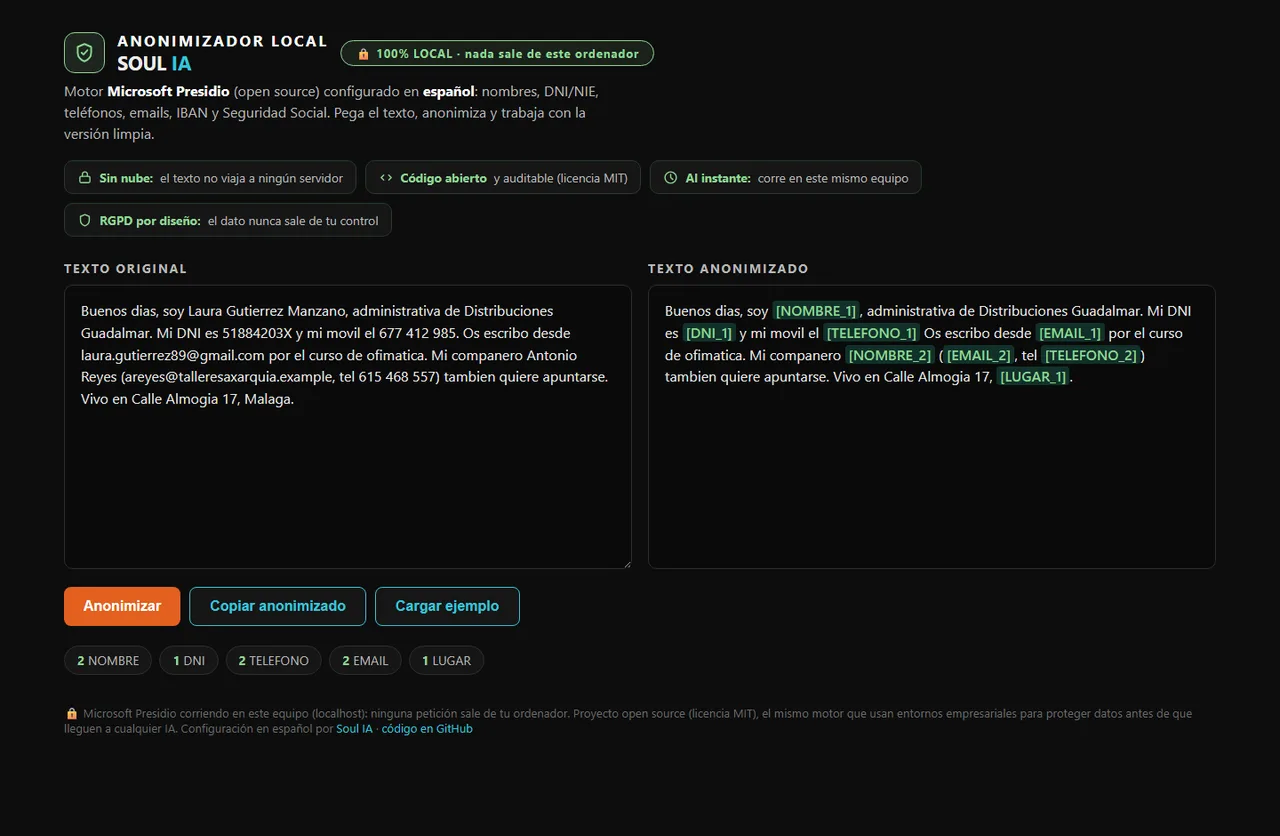
- 100% local: it runs on your computer (localhost) and the text never travels to any server. A cloud-based anonymizer would defeat the purpose.
- Tuned for Spain: it detects DNI and NIE national IDs, Spanish phone numbers, social security numbers, IBANs and emails from any domain, plus names, places and organizations.
- Consistent labels: [NOMBRE_1] is always the same person across the whole text, so the AI's answer still makes sense when you bring it back.
- A single Python file under the MIT license: no accounts, no sign-up, no cost, and the code in plain sight to audit it.
The engine is Microsoft Presidio, an open source project used in enterprise environments to protect data before it reaches any AI. Our contribution is the Spanish configuration: Presidio's public demo works very well in English, but a Spanish DNI, a +34 mobile number or a Spanish IBAN slip past it unless someone teaches it. That is what we added, together with the interface and the numbered labeling system.
Download the anonymizer for free on GitHub →
Installing it takes three steps with Python: install the dependencies, download the Spanish language model and start the server. The exact instructions, with a screenshot and a real example, are in the repository.
Can I fully trust an automatic anonymizer?
No, and whoever tells you otherwise is selling you something. No automatic system guarantees 100% detection: a nickname, an oddly written item or a very specific context can slip through. That is why the interface highlights every substitution in green: the final look before pasting is still yours, and so are your GDPR obligations. Think of the tool as a seatbelt: it reduces the risk enormously, it does not make you immortal.
What if my team already uses ChatGPT every day?
Then this is not optional. With teams already using AI daily we work on three things: a clear rule (nothing identifiable goes out without anonymizing), a tool at hand to follow it without friction, and a short training so everyone understands the why. That is exactly the context where this tool was born, and the reason we are releasing it: the more companies use AI with their head, the better for everyone.
Talk to Soul IA about AI in your company →
AI is already inside your company, with or without permission. The difference between a team that profits from it and one that fears it lies in small habits like this one: removing the risk without removing the advantage. Anonymizing before pasting is the first one.
Written by
Jorge Marín Pérez · Founder of Soul IA
I help SMEs automate their customer service and processes with AI, from Málaga. What I write here comes from what we build every week for real businesses.
Want to know what you could automate in your business?
Talk to Soul IA