
Almost $2,000 wasted in one month: what we learned auditing our own AI spend

It happened to us a few weeks ago. One of those slow afternoons of tidying things up, someone on the team started wondering what AI was really costing us. Not the subscription, anyone can see that in the bank. The detail: of every euro we pay, how much does useful work and how much just evaporates. We opened the logs, added it all up and sat there staring at the screen for a good while: almost $2,000 a month could have been saved. In a single account.
The afternoon we opened the hood
Some context first. At Soul IA, AI is not a toy: we use it all day to code, write, build automations and reply. And the same thing happened to us as to any business: the bill gets paid and life goes on, because it is worth it and there is work to do. Nobody opens the hood.
What almost nobody knows is that every AI session leaves a written trail, line by line, of what it spends. It sits right there, on your own computer, waiting for someone to read it. And nobody ever does. We had not done it either, and this is literally our job.
So we did the obvious thing: we took the account of the heaviest user on the team and added it all up. A full month, session by session, with the official prices in front of us. No tricks and no rounding in our favour.
First surprise: AI does not charge for what it creates
Anyone would bet the expensive part is what the AI produces: the text it writes, the code it generates, the answers. Try one percent. Out of every $100, one and a bit goes to new text. The rest goes somewhere nobody looks.
Memory. Every time you write to it, the machine re-reads the entire conversation from the start: the files you shared, the instructions, what you said two hours ago. And every re-read gets billed. It is like paying someone to re-read the client's whole folder every time you ask a two-line question.
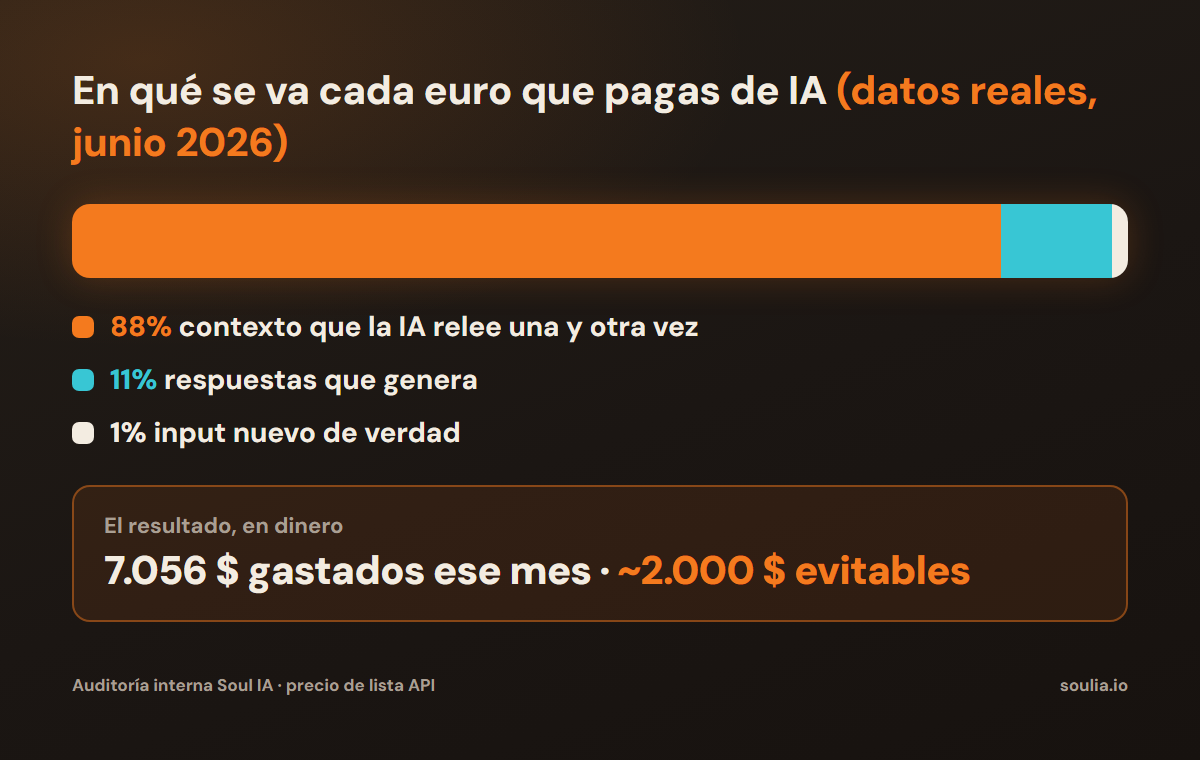
88% of our spend was that. Re-reading. Not creating anything new: re-reading.
Second surprise: the expensive model doing everything
These tools ship several models, like a van and a truck: a top one that costs a fortune and lighter ones at a third or a fifth of the price. Guess where 97% of our spend was running. Exactly. On the expensive one. By default.
And the funny part (so we do not cry) is that it was also being used to find a file, move a folder or check a list. Van jobs billed at truck prices. Nobody had decided it: simply nobody had said otherwise. Month after month.
And the third, the silliest one: the rock in the backpack
One more left. When the AI reads a huge file or a giant output, it enters the conversation once and then gets paid for again on every re-read. Like a rock in a backpack: you put it in once and you carry it up every hill. We had no cap in place. Big rocks, daily.
The most annoying part: none of the three mistakes shows on the invoice. The invoice only shows the total. The mistakes only appear when you open the logs and add them up, and someone has to go looking for them.
What we changed (and what it meant in money)
- Mechanical work goes to the cheap model. Searching, sorting, repetitive tasks: same result, a fraction of the price. This lever alone was the bulk of the savings.
- Only the context you need. Shorter sessions, each task in its own place, nothing unrelated mixed in. Every message re-reads less, so it costs less.
- A cap on giant dumps. No more rocks in the backpack: a trimmed result costs less on every later re-read.
In numbers: the first lever alone was worth between $1,000 and $1,800 a month in that account. Without changing tools, without using AI any less and without touching the quality of what matters. Same work, better placed.
How to find out what your team is leaving on the table
For this audit we built a fairly serious prompt: it reads the local usage logs, adds them up correctly (this is where almost everyone fails, the total comes out two or three times inflated if you do not deduplicate properly) and gives you the full picture. How much is spent, on what, with which model and in which project. It runs in minutes and uploads nothing anywhere: it works on your own files.
If you want to run it on your team's accounts, message us on WhatsApp with the word OPTIMIZAR and we will send it over with its usage guide. It costs nothing and it might save you a good chunk every month.
One last thing, because it needs saying: the lever that saves the most does not come in any generic prompt. It depends on how your team works, which tasks each person repeats and where AI enters your operation. That only shows up by looking at your specific case. If a single account of ours surfaced almost $2,000 a month, imagine what a whole operation looks like. We can go through it with you in 20 minutes.
Book your 20 minutes here (pick a slot, the Meet invite arrives instantly) →
Or message us on WhatsApp with the word OPTIMIZAR and we will send you the prompt
Written by
Jorge Marín Pérez · Founder of Soul IA
I help SMEs automate their customer service and processes with AI, from Málaga. What I write here comes from what we build every week for real businesses.
Want to know what you could automate in your business?
Talk to Soul IA